
- Tech Research Group
- July 26, 2025
- 1 Comment
Your Guide to Bringing Ideas to Life
3D printing has revolutionized prototyping, crafting, and even home decor, making it accessible to hobbyists and professionals alike. If you’re looking to dive into the world of additive manufacturing, Amazon India offers a wide array of options of 3D Printers. But with so many choices, how do you pick the right one?
We’ve scoured Amazon India to bring you our top 2 low-cost FDM (Fused Deposition Modeling) 3D printers, highlighting their features, pros, and cons to help you make an informed decision.


1. Creality Ender 3 V3 KE

Tags: #BudgetFriendly, #FastPrinting, #BeginnerFriendly, #DirectDrive
The Ender 3 series 3D Printers have consistently been a fan-favorite for its affordability and upgradeability, and the V3 KE takes it a step further with impressive speed and user-friendly features.
Creality Ender 3 V3 KE Features:
Klipper Firmware: Unlocks high-speed printing (up to 500 mm/s) and advanced features like input shaping.
Automatic Bed Leveling (CR Touch): Simplifies setup and ensures consistent first layers.
Direct Drive Extruder (Sprite): Excellent for printing flexible filaments like TPU and offers better control.
PEI Coated Spring Steel Build Plate: Provides excellent adhesion and easy print removal.
Linear Rails on X-Gantry: Enhances print quality and stability.
4.3″ Touch Screen: Intuitive interface for easy operation.
Creality Ender 3 V3 KE Pros:
Exceptional Speed for its Price: Delivers fast prints, significantly reducing print times.
Great Value for Money: Packed with features usually found in higher-priced models.
Easy Assembly: 90% pre-built, making it quick to set up for beginners.
Reliable Extrusion: The direct drive handles a variety of filaments well.
Active Community: Large user base means plenty of online resources and support.
Creality Ender 3 V3 KE Cons:
Limited Klipper Interface (Creality’s version): While it uses Klipper, Creality’s interface might not offer full customization for advanced users without some tinkering.
Accelerometer Not Included: You might need to add one for optimal input shaping calibration.
2. Anycubic Kobra 2 Neo

Tags: #EntryLevel, #Affordable, #HighSpeed, #AutoLeveling
The Kobra 2 Neo aims to make high-speed 3D printing accessible to everyone, especially beginners, with its user-friendly design and impressive print speeds for its price point.
Anycubic Kobra 2 Neo Features:
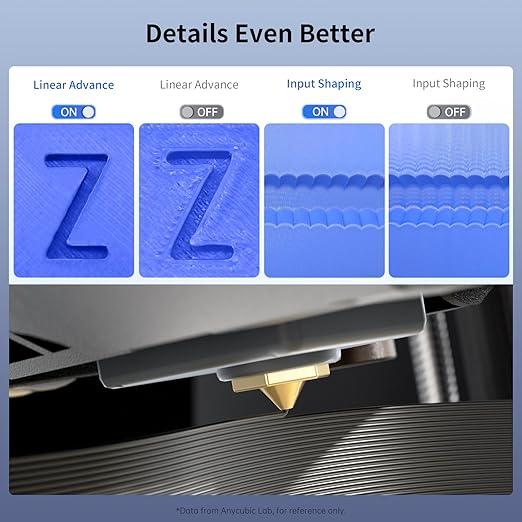
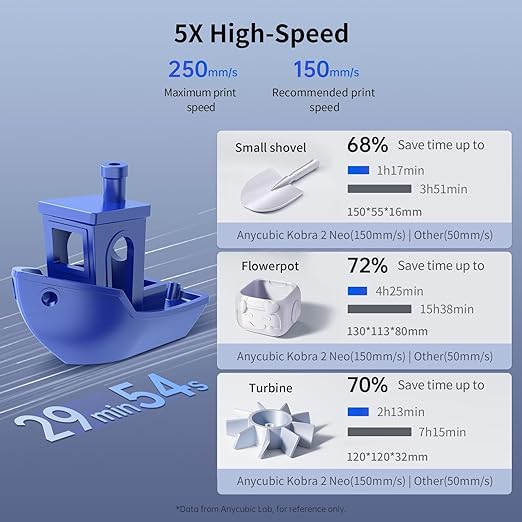
High Print Speed: Capable of speeds up to 250 mm/s, making it significantly faster than many entry-level printers.
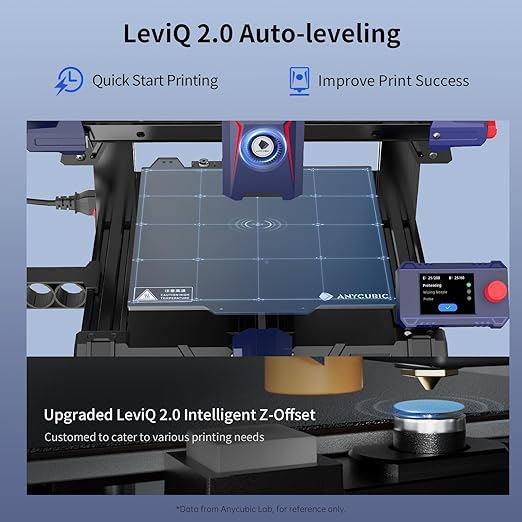
LeviQ Automatic Leveling: Anycubic’s auto-leveling system simplifies bed calibration.
Direct Extruder: Provides precise filament control and is good for flexible materials.
Magnetic PEI Plate: Easy print removal and good adhesion.
Compact Design: Fits well in smaller workspaces.
Anycubic Kobra 2 Neo Pros:
Excellent Price-to-Performance Ratio: Offers impressive speed and features at a very competitive price.
Very Easy to Use for Beginners: Auto-leveling and a straightforward interface make it a great starting point.
Quick Assembly: Most users report a fast and hassle-free setup.
Good Print Quality: Delivers surprisingly good results for its category.
Anycubic Kobra 2 Neo Cons:
Build Quality Can Be Average: Some users might find certain components feel less robust than higher-end models.
Limited Advanced Features: May not offer the same level of customization or advanced functionalities as more expensive printers.
Choosing Your Perfect 3D Printers
When making your choice, consider these factors:
Your Experience Level: Are you a complete beginner or an experienced maker?
Budget: 3D printers range from highly affordable to premium.
Print Speed: How quickly do you need your prints to finish?
Materials You Plan to Use: Do you only need to print PLA, or do you want to experiment with ABS, PETG, or flexible filaments?
Build Volume: How large objects do you plan to print?
Features: Do you need auto-leveling, direct drive, or an enclosed chamber?
Community Support: A strong online community can be invaluable for troubleshooting and learning.
No matter your choice, entering the world of 3D printing is an exciting journey. Happy printing!
Frequently Asked Questions (FAQs) About 3D Printers
1. What is the key difference between FDM and Resin (SLA) 3D printers?
FDM (Fused Deposition Modeling) printers are generally more affordable and use plastic filament (like PLA or ABS). They are best for functional parts, larger prints, and beginners. Resin (SLA) printers use liquid photopolymer resin and are superior for fine detail, smooth surface finish, and intricate models.
2. What are the best materials for a beginner hobbyist to start with?
PLA (Polylactic Acid) is the most common starting material. It is derived from renewable resources and is biodegradable. PLA is user-friendly, prints easily with minimal warping, and has a low odor, making it safe for home use.
3. Why are Resin printers often considered “messier” and less beginner-friendly?
Resin printing is a “wet printing” process. It requires washing the finished print in chemicals like isopropyl alcohol (IPA) and then curing it under UV light. The resins are toxic and require users to wear gloves and ensure proper ventilation.
4. Can FDM printers print multi-color models?
Yes. While many FDM printers are single-color, new models, such as those from Bambu Lab, offer multi-color print capability via specialized add-ons (like AMS). This expands the creative possibilities without requiring you to paint the final model.
5. Is it possible to print strong, functional parts on a hobbyist printer?
Absolutely. FDM printers using materials like Nylon or Polycarbonate are known for producing parts with superior mechanical strength and impact resistance. You can also use Carbon Fiber Filled filaments for increased stiffness and strength.
🎉🔥Show Your Order - ENTER OUR GIVEAWAY!🔥🎉
— ANYCUBIC (@anycubic3dprint) August 29, 2025
We're turning 10 YEARS old 🥳 and it's time to celebrate YOU — the ones who made this journey possible! 💙✨
Thank you for every print, every idea, and every bit of support! 🙏
To celebrate, We've prepared SPECIAL GIFTS just for… pic.twitter.com/Sf1IutqNqD
Your Next Creation Awaits!
The world of 3D printing is now faster, smarter, and more accessible than ever. Whether you need a high-speed machine for functional prototypes or a resin printer for jewelry patterns, the perfect tool is available. The only limit now is your imagination.
What is the most ambitious project you dream of creating with a 3D printer? Is it a complex piece of cosplay armor, a functional tool for your home, or intricate miniatures?
For reviews of Laptops, check out here. Share your next great idea in the comments. Let’s see what you’re printing next!
#3DPrinting, #3DPrinter, #FDM, #ResinPrinting, #Hobbyist, #MakersGonnaMake, #TechReview, #AdditiveManufacturing, #DIY, #CreativeTech
Important Note: This post contains affiliate links. If you choose to click on a product link and make a purchase, we may receive a small commission at no extra cost to you. This commission helps support our content creation and research efforts. We only recommend products we believe will provide genuine value to our readers.
- Tags:
- 3D Printer
- 3D Printing Guide
- Amazon India
- AnkerMake M5C
- Anycubic Kobra 2 Neo
- Auto-Leveling
- Bambu Lab P1P
- Beginner 3D Printer
- Best 3D Printers
- Creality Ender 3 V3 KE
- Direct Drive 3D Printer
- Enclosed 3D Printer
- FDM Printer
- Gadgets
- High-Speed 3D Printer
- Klipper Firmware
- Prototyping
- QIDI Tech X-Smart 3

Tech Research Group
Twenty years from now you will be more disappointed by the things that you didn’t do than by the ones you did do. Sail away from the safe harbor.
Your article helped me a lot, is there any more related content? Thanks!